

Skip to content
Profitaa Logo

Profitaa

  • Home
  • FeaturesExpand
    • NRS E-Invoicing Integration
    • Procurement, Multi-Inventory & Stock Control
    • Automated HR & Payroll
    • Simple Accounting Software for Growing Businesses
    • Business Investments & Banking
    • Production Pipeline & Manufacturing
    • Asset & Property Management
    • Easy Project Management & Task Tracking Software
    • For Accountants & Consultants
  • Preview
  • FAQ
  • PricingExpand
    • Basic Plan Pricing for Startups & Entrepreneurs
    • Standard Plan for Expanding Enterprises
    • Compare Pricing Plans; Basic vs Standard vs enterprise
  • LinksExpand
    • Contact Support
    • Publications
    • Enterprise Security, Trust & Data Compliance
    • Privacy Policy
    • Terms of Services
Sign Up
Account Login
Profitaa Logo
Profitaa
SIGN UP
Account Login
View Categories
  • Home
  • Help Topics
  • Human Resources (HR)
  • HR Employee Dashboard

HR Employee Dashboard

< 1 min read

0:00 / 0:39
  • View as Markdown Open this page as plain Markdown (opens in a new tab)
  • Open in ChatGPT Ask questions about this page (opens in a new tab)
  • Open in Claude Ask questions about this page (opens in a new tab)
  • Open in Google AI Studio Ask questions about this page (Google account required) (opens in a new tab)

After an Employee record is created, they can proceed to the self-service by using the email address on their profile and the default password: password. On the Self-service, employees will be able to view and update certain areas of their records, biodata, Next of Kin, Job (Engagements), Education, Guarantor, Referees, Memo, Awards, Medical, Salary, Pension, Tasks, Discipline, Attendance, Appraisal, Training, Leave, Promotion, OKR.


At the left sidebar, the employee photo along with key details are displayed. At the middle are recent tasks assigned to the employee (from Projects) and a graph showing the OKR progress by the right.


The HR Administrator also has access to every employee dashboard and pages.
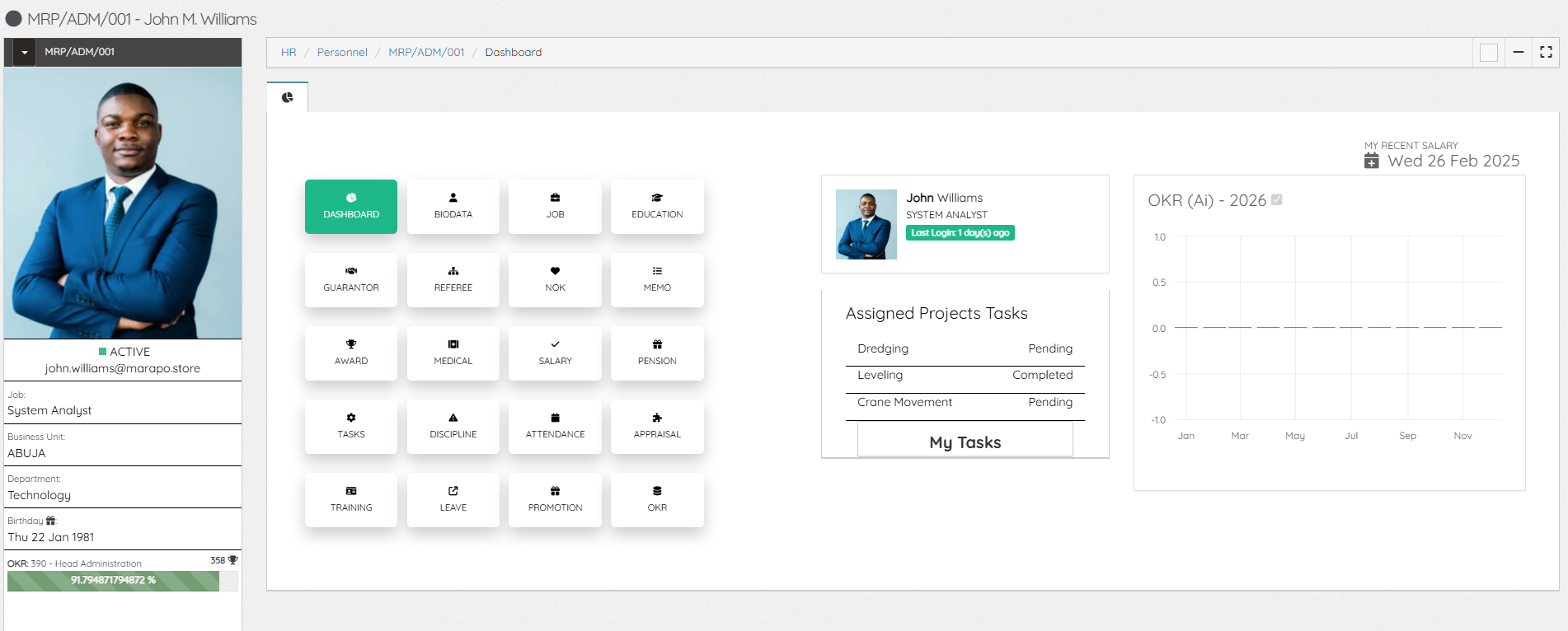
 

HR Self-service

Updated on November 4, 2026

What are your Feelings

  • Happy
  • Normal
  • Sad

Share This Article :

  • Facebook
  • X
  • LinkedIn
  • Pinterest
HR Employee NewHR Employee Biodata

Powered by BetterDocs

Profitaa Logo
  • Home
  • Features
  • Preview
  • FAQ
  • Pricing
  • Links

© 2026 Profitaa

Facebook X Instagram TikTok YouTube
Scroll to top
  • Home
  • Features
    • NRS E-Invoicing Integration
    • Procurement, Multi-Inventory & Stock Control
    • Automated HR & Payroll
    • Simple Accounting Software for Growing Businesses
    • Business Investments & Banking
    • Production Pipeline & Manufacturing
    • Asset & Property Management
    • Easy Project Management & Task Tracking Software
    • For Accountants & Consultants
  • Preview
  • FAQ
  • Pricing
    • Basic Plan Pricing for Startups & Entrepreneurs
    • Standard Plan for Expanding Enterprises
    • Compare Pricing Plans; Basic vs Standard vs enterprise
  • Links
    • Contact Support
    • Publications
    • Enterprise Security, Trust & Data Compliance
    • Privacy Policy
    • Terms of Services