

Skip to content
Profitaa Logo

Profitaa

  • Home
  • FeaturesExpand
    • NRS E-Invoicing Integration
    • Procurement, Multi-Inventory & Stock Control
    • Automated HR & Payroll
    • Simple Accounting Software for Growing Businesses
    • Business Investments & Banking
    • Production Pipeline & Manufacturing
    • Asset & Property Management
    • Easy Project Management & Task Tracking Software
    • For Accountants & Consultants
  • Preview
  • FAQ
  • PricingExpand
    • Basic Plan Pricing for Startups & Entrepreneurs
    • Standard Plan for Expanding Enterprises
    • Compare Pricing Plans; Basic vs Standard vs enterprise
  • LinksExpand
    • Contact Support
    • Publications
    • Enterprise Security, Trust & Data Compliance
    • Privacy Policy
    • Terms of Services
Sign Up
Account Login
Profitaa Logo
Profitaa
SIGN UP
Account Login
View Categories
  • Home
  • Help Topics
  • Human Resources (HR)
  • HR Employee Job (Engagements)

HR Employee Job (Engagements)

< 1 min read

0:00 / 0:55
  • View as Markdown Open this page as plain Markdown (opens in a new tab)
  • Open in ChatGPT Ask questions about this page (opens in a new tab)
  • Open in Claude Ask questions about this page (opens in a new tab)
  • Open in Google AI Studio Ask questions about this page (Google account required) (opens in a new tab)

Profitaa HR system allows for multiple job engagements. An employee can have multiple job engagements which reflect various positions they have held in the company, with their details such as Business Units, Starting and Ending Date of Engagement. The current job engagement of the employee is Starred and used in the system for identification and payroll processing.


A click on any of the job engagement opens the details panel. To add a new Job Engagement to an employee record, click the NEW button, decide the job status, Business Unit (Company Branch), Department/Unit, Job Position, Engagement Type (Full-time, Part-Time, Internship, Contract), Basic Salary, Salary Group, Payroll Group, Entry Mode (Direct, TalentHub, Transfer, Referred, Others), Engagement and Resumption Date. The HR Administrator can also append some notes/comments on the engagement, not visible to employee.

Setting the status as ACTIVE will make this the current job of employee and set previous as INACTIVE. Payroll will be processed on the ACTIVE job engagement.
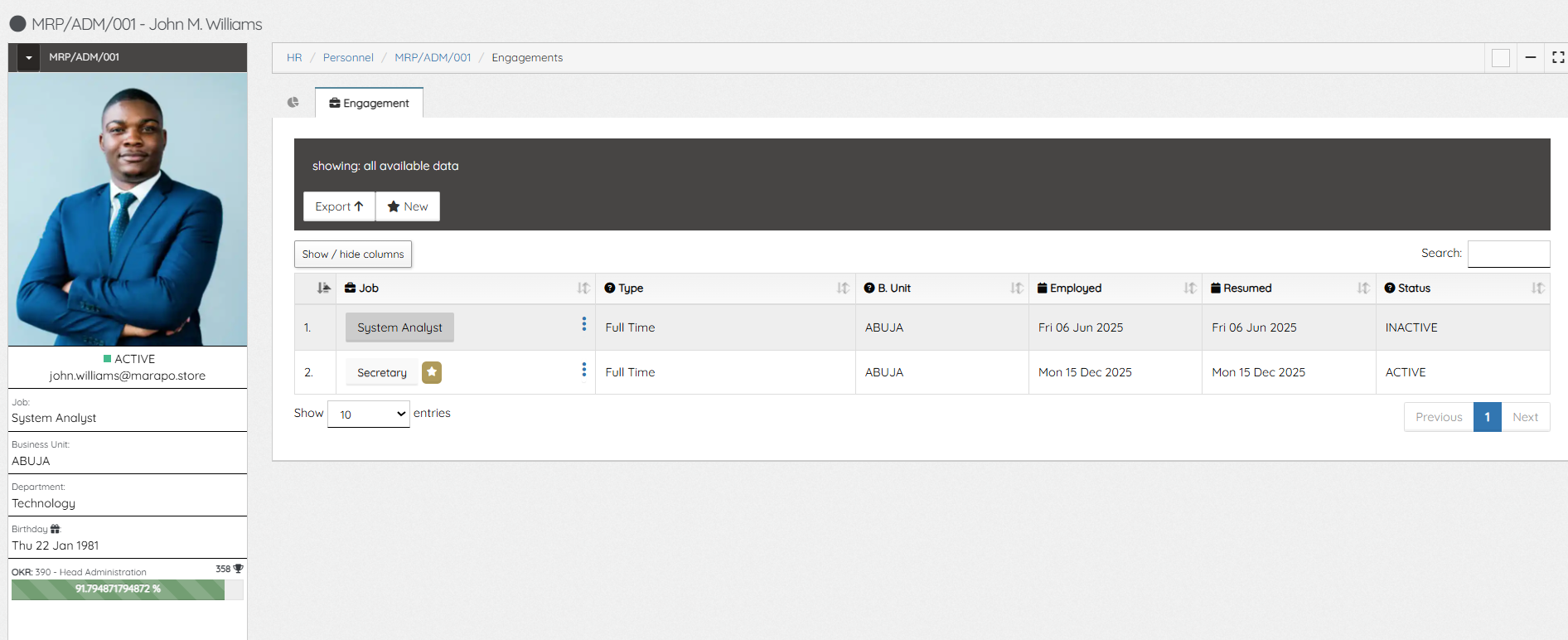
 

HR Job Engagements

Updated on November 4, 2026

What are your Feelings

  • Happy
  • Normal
  • Sad

Share This Article :

  • Facebook
  • X
  • LinkedIn
  • Pinterest
HR Employee BiodataHR Employee Education

Powered by BetterDocs

Profitaa Logo
  • Home
  • Features
  • Preview
  • FAQ
  • Pricing
  • Links

© 2026 Profitaa

Facebook X Instagram TikTok YouTube
Scroll to top
  • Home
  • Features
    • NRS E-Invoicing Integration
    • Procurement, Multi-Inventory & Stock Control
    • Automated HR & Payroll
    • Simple Accounting Software for Growing Businesses
    • Business Investments & Banking
    • Production Pipeline & Manufacturing
    • Asset & Property Management
    • Easy Project Management & Task Tracking Software
    • For Accountants & Consultants
  • Preview
  • FAQ
  • Pricing
    • Basic Plan Pricing for Startups & Entrepreneurs
    • Standard Plan for Expanding Enterprises
    • Compare Pricing Plans; Basic vs Standard vs enterprise
  • Links
    • Contact Support
    • Publications
    • Enterprise Security, Trust & Data Compliance
    • Privacy Policy
    • Terms of Services