

Skip to content
Profitaa Logo

Profitaa

  • Home
  • FeaturesExpand
    • NRS E-Invoicing Integration
    • Procurement, Multi-Inventory & Stock Control
    • Automated HR & Payroll
    • Simple Accounting Software for Growing Businesses
    • Business Investments & Banking
    • Production Pipeline & Manufacturing
    • Asset & Property Management
    • Easy Project Management & Task Tracking Software
    • For Accountants & Consultants
  • Preview
  • FAQ
  • PricingExpand
    • Basic Plan Pricing for Startups & Entrepreneurs
    • Standard Plan for Expanding Enterprises
    • Compare Pricing Plans; Basic vs Standard vs enterprise
  • LinksExpand
    • Contact Support
    • Publications
    • Enterprise Security, Trust & Data Compliance
    • Privacy Policy
    • Terms of Services
Sign Up
Account Login
Profitaa Logo
Profitaa
SIGN UP
Account Login
View Categories
  • Home
  • Help Topics
  • Account
  • Payroll Automation

Payroll Automation

< 1 min read

0:00 / 0:49
  • View as Markdown Open this page as plain Markdown (opens in a new tab)
  • Open in ChatGPT Ask questions about this page (opens in a new tab)
  • Open in Claude Ask questions about this page (opens in a new tab)
  • Open in Google AI Studio Ask questions about this page (Google account required) (opens in a new tab)

In automating Payroll on Profitaa, its a series of simple steps that produced amazing results. There is no limit to how many payrolls that can be generated or the number of employees in your organisation.


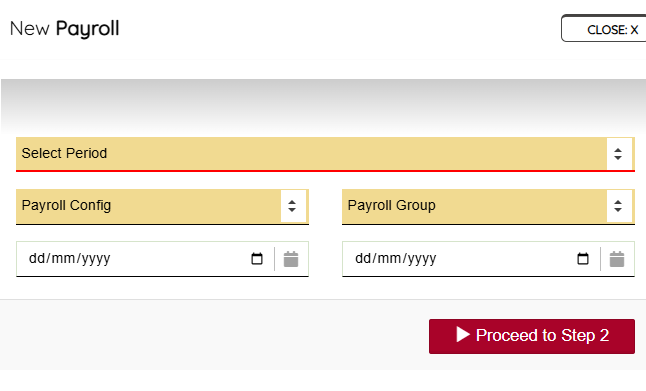
Click the “NEW” button, select the period you are generating for e.g. January 2026, Payroll Configuration to use, Payroll Group, and define the calendar dates that entails your selected period – in some scenarios the selected period (e.g. January 2026) might have different working dates, so its important you select the date range for that period.


This is also necessary for the computation of attendance – present and absent. Yes! Profitaa calculates your Employee attendances as part of payroll computation, deducting the days they are not “Present” at work. Refer to our Attendance system to understand how this work.


Click the “Proceed to Step 2” to continue the Payroll process.
 

Updated on November 4, 2026

What are your Feelings

  • Happy
  • Normal
  • Sad

Share This Article :

  • Facebook
  • X
  • LinkedIn
  • Pinterest
Payroll GroupPayroll Configurations

Powered by BetterDocs

Profitaa Logo
  • Home
  • Features
  • Preview
  • FAQ
  • Pricing
  • Links

© 2026 Profitaa

Facebook X Instagram TikTok YouTube
Scroll to top
  • Home
  • Features
    • NRS E-Invoicing Integration
    • Procurement, Multi-Inventory & Stock Control
    • Automated HR & Payroll
    • Simple Accounting Software for Growing Businesses
    • Business Investments & Banking
    • Production Pipeline & Manufacturing
    • Asset & Property Management
    • Easy Project Management & Task Tracking Software
    • For Accountants & Consultants
  • Preview
  • FAQ
  • Pricing
    • Basic Plan Pricing for Startups & Entrepreneurs
    • Standard Plan for Expanding Enterprises
    • Compare Pricing Plans; Basic vs Standard vs enterprise
  • Links
    • Contact Support
    • Publications
    • Enterprise Security, Trust & Data Compliance
    • Privacy Policy
    • Terms of Services